시골청년의 엔지니어이야기 ( 진반장 )

Global Members Navigation

  • 로그인
  • 회원가입

Global Site Navigation

  • HOME
  • LINUX
  • Kubernetes
  • MYSQL
  • WINDOWS
  • MS-SQL
  • NCLOUD
  • NETWORK
  • MONITORING
  • AI
  • Battery
  • DIY
  • 용량계산
  • 모델조회
  • 검색
    검색

Global Navigation for Mobile

  • 로그인
  • 회원가입
검색
  • Menu
  • HOME
  • LINUX
  • Kubernetes
  • MYSQL
  • WINDOWS
  • MS-SQL
  • NCLOUD
  • NETWORK
  • MONITORING
  • AI
  • Battery
  • DIY
  • 용량계산
  • 모델조회

  • HOME
  • 작성일 '2015.11.27'

검색

Blog 검색  |  검색결과 2건

windows CPU / Memory / Disk Load
+

windows CPU / Memory / Disk Load

admin 2015.11.27
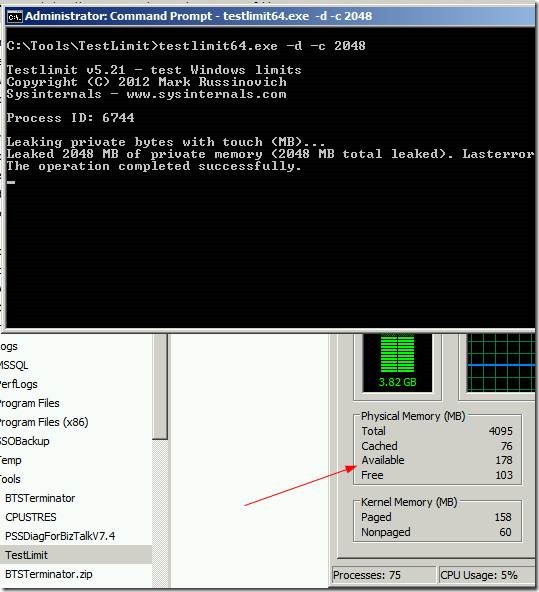
I have seen a lot of people searching for tools to simulate high CPU, Memory and Disk issues. Here are the tools I use Simulate High CPU Usage CPUSTRES.EXE is a tool you can use to simulate High CPU usage by an user mode process. Its available for download from the Windows Sysinternals website. Here I have used CPUSTRES to simulate 50% CPU usage. CPUSTRES also has options to change the priority of...
Read More..
mysql 5.7 install (comfile) / mysql 5.7.9
+

mysql 5.7 install (comfile) / mysql 5.7.9

admin 2015.11.27
MYSQL 5.7 INSTALL ( mysql 5.7.9 ) O/S : CentOS 6.x (64bit) 설치시 문제가 많다는 정보에 의해 내용 일부 수정했습니다. 수정날짜 2017/01/31 1. mysql 5.7.9 버전을 설치하기 위해서는 boost 라이브러리가 필요하다  파일은 같은 디록토리 내에서 받고 압축을 풀고 mysql을 설치 진행하면 된다. [crayon-6a2e045ae4a65357588425/]   2.  make / make install 을 진행한다  ( make 작업시 cpu 코어갯수대로 진행을 할수 있게 옵션을 줘서 진행) [crayon-6a2e045ae4a6f449740624/]   3.  mysql 사용자 추가 및 권한 설정 / 환경설정 파일 복사 [crayon-6a2e045a...
Read More..
1

카테고리

  • Kubernetes (4)
  • Openstack (3)
  • AI (3)
  • Apache (41)
  • IIS (40)
  • About (1)
  • LINUX (364)
  • Was (11)
  • 일반 (83)
  • WINDOWS (153)
  • DNS (8)
  • MYSQL (71)
  • Security (12)
  • 일반 (201)
  • MS-SQL (46)
  • Shell (28)
  • Oracle (6)
  • Troble Shooting (44)
  • NCLOUD (2)
  • Power Shell (17)
  • Mail (12)
  • python (3)
  • RAID (5)
  • NETWORK (33)
  • 국제트래픽 (1)
  • MONITORING (17)
  • 라즈베리 (1)
  • DIY (49)
  • Battery (21)
  • 직구 (1)
  • 기타 (6)

최근포스트


    Fatal error: Allowed memory size of 134217728 bytes exhausted at /usr/local/src/php-7.3.33/Zend/zend_string.h:133 (tried to allocate 192 bytes) in /free/home/xinet/html/wp-includes/wp-db.php on line 1889